> ## Documentation Index
> Fetch the complete documentation index at: https://docs.skarmy.ai/llms.txt
> Use this file to discover all available pages before exploring further.
# Publish your site
> Deploy your workspace to a public address at yourname.skarmy.ai, approve the exact version going out, and get a link you can share.
Publishing puts your workspace on the public internet at an address you choose once. Nothing deploys without your explicit approval: **Publish** proposes, you approve.
## Before you start
* A completed build. The Builder must have finished at least one milestone.
* A real account. Guests can talk to the coach, but publishing requires signing up.
* Enough credits to cover the publish fee. See [How credits work](/credits/how-credits-work).
## Publish for the first time
Select **Publish** at the top of the workspace. Its tooltip reads **Publishes your last completed milestone**.
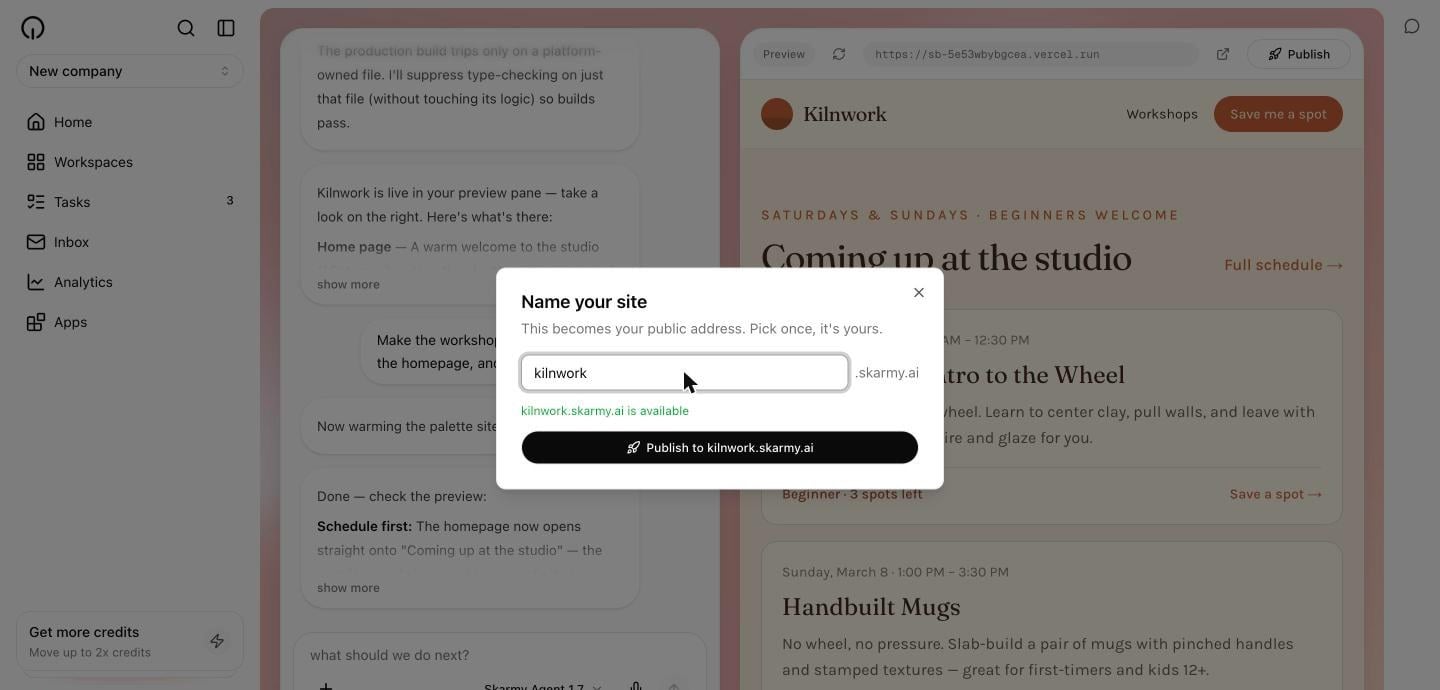
A dialog opens titled **Name your site**. Type into the field; your address is that name plus `.skarmy.ai`.
The hint under the field checks availability as you type:
| Hint | Meaning |
| ------------------------------------------------- | ------------------------------------------------------------------ |
| `kilnwork.skarmy.ai is available` | Yours to claim. |
| `That name is already taken. Try another` | Someone else has it. |
| `That name is reserved. Try another` | Reserved by Skarmy. See [Site addresses](/publish/site-addresses). |
| `Use 3–63 lowercase letters, numbers, or hyphens` | The name's shape is wrong. |
| `Checking…` | Availability check in flight. |
 A dialog titled **Review before publishing** shows exactly what you are agreeing to:
| Row | What it tells you |
| ---------------- | ----------------------------------------------------------- |
| **Version** | Which build milestone goes out, and how many files it holds |
| **Audience** | `Public internet` — anyone with the link can see it |
| **Cost** | The publish fee in credits, or `Free` |
| **What happens** | Plainly, what approving does |
| **Undo** | How you would walk it back |
A dialog titled **Review before publishing** shows exactly what you are agreeing to:
| Row | What it tells you |
| ---------------- | ----------------------------------------------------------- |
| **Version** | Which build milestone goes out, and how many files it holds |
| **Audience** | `Public internet` — anyone with the link can see it |
| **Cost** | The publish fee in credits, or `Free` |
| **What happens** | Plainly, what approving does |
| **Undo** | How you would walk it back |
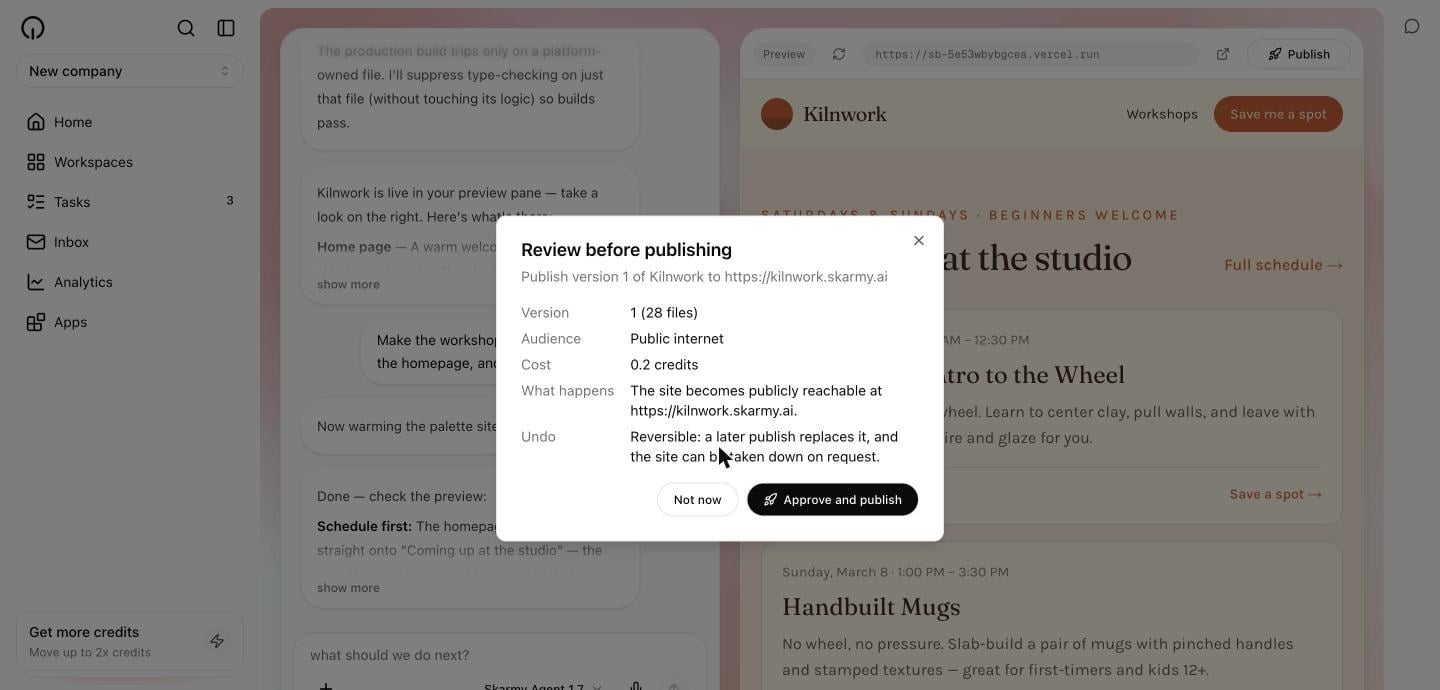 Select **Approve and publish**, or **Not now** to walk away. Only the explicit approval deploys anything.
**Expected result:** the **Publish** button changes to **Deploying…**.
Deployment takes a few minutes. You can keep working, and you can reload the page — the deployment carries on either way. Skarmy does not announce the address until the site actually serves.
**Expected result:** a **Live at yourname.skarmy.ai** link appears next to the **Publish** button.
Select the link. It opens in a new tab.
**Expected result:** your site loads at its public address.
You choose your address once and it belongs to that workspace permanently. There is currently no way to change it, so pick a name you are happy to share.
## What gets published
Publishing deploys **the last completed milestone**, not whatever the Builder is doing right now. If it is mid-change, publishing ships the last finished state.
Your published site is a snapshot. It does not update when your preview updates. To refresh it, see [Update a published site](/publish/update-a-published-site).
## Ask the Builder to publish
You can also just say so:
```text theme={null}
Publish this.
```
The Builder proposes the publish and you get the same review dialog — it cannot deploy without your approval. It offers to publish after finishing the first complete version, and only proposes it once you say yes.
The Builder only publishes work that passed its own checks. If a publish fails, it tells you rather than reporting success.
## Verify
* A **Live at …** link appears beside the **Publish** button.
* Opening it in a private or incognito window loads your site — proving it is genuinely public.
* The site matches your last completed milestone.
## Troubleshooting
| Message | What it means | What to do |
| --------------------------------------------------------------------- | ------------------------------------------------------ | ------------------------------------------------------------------------- |
| `Nothing to publish yet. Finish a build first` | No completed milestone. | Wait for the Builder's summary, then publish. |
| `You're out of credits. Top up on the Usage page` | Balance will not cover the publish fee. | Add credits on the **Usage** page. |
| `That approval expired. Start the publish again` | The review sat too long before you approved. | Select **Publish** again. |
| `Your files changed since this was proposed. Start the publish again` | The Builder changed something after the review opened. | Select **Publish** again to review the new version. |
| `Publish failed. Try again` | The deployment did not complete. | Select **Publish** again. A failed publish never loses your claimed name. |
| `That name is already taken. Try another` | Another workspace claimed it. | Choose a different name. |
| `Couldn't check availability. You can still try to publish` | The availability check failed, not the name. | Try publishing anyway — the claim is checked on the server. |
Signed out or using a guest session? Publishing prompts you to create an account first. Everything you have built is kept.
## Next
Naming rules and reserved names.
Ship your latest changes.
Select **Approve and publish**, or **Not now** to walk away. Only the explicit approval deploys anything.
**Expected result:** the **Publish** button changes to **Deploying…**.
Deployment takes a few minutes. You can keep working, and you can reload the page — the deployment carries on either way. Skarmy does not announce the address until the site actually serves.
**Expected result:** a **Live at yourname.skarmy.ai** link appears next to the **Publish** button.
Select the link. It opens in a new tab.
**Expected result:** your site loads at its public address.
You choose your address once and it belongs to that workspace permanently. There is currently no way to change it, so pick a name you are happy to share.
## What gets published
Publishing deploys **the last completed milestone**, not whatever the Builder is doing right now. If it is mid-change, publishing ships the last finished state.
Your published site is a snapshot. It does not update when your preview updates. To refresh it, see [Update a published site](/publish/update-a-published-site).
## Ask the Builder to publish
You can also just say so:
```text theme={null}
Publish this.
```
The Builder proposes the publish and you get the same review dialog — it cannot deploy without your approval. It offers to publish after finishing the first complete version, and only proposes it once you say yes.
The Builder only publishes work that passed its own checks. If a publish fails, it tells you rather than reporting success.
## Verify
* A **Live at …** link appears beside the **Publish** button.
* Opening it in a private or incognito window loads your site — proving it is genuinely public.
* The site matches your last completed milestone.
## Troubleshooting
| Message | What it means | What to do |
| --------------------------------------------------------------------- | ------------------------------------------------------ | ------------------------------------------------------------------------- |
| `Nothing to publish yet. Finish a build first` | No completed milestone. | Wait for the Builder's summary, then publish. |
| `You're out of credits. Top up on the Usage page` | Balance will not cover the publish fee. | Add credits on the **Usage** page. |
| `That approval expired. Start the publish again` | The review sat too long before you approved. | Select **Publish** again. |
| `Your files changed since this was proposed. Start the publish again` | The Builder changed something after the review opened. | Select **Publish** again to review the new version. |
| `Publish failed. Try again` | The deployment did not complete. | Select **Publish** again. A failed publish never loses your claimed name. |
| `That name is already taken. Try another` | Another workspace claimed it. | Choose a different name. |
| `Couldn't check availability. You can still try to publish` | The availability check failed, not the name. | Try publishing anyway — the claim is checked on the server. |
Signed out or using a guest session? Publishing prompts you to create an account first. Everything you have built is kept.
## Next
Naming rules and reserved names.
Ship your latest changes.